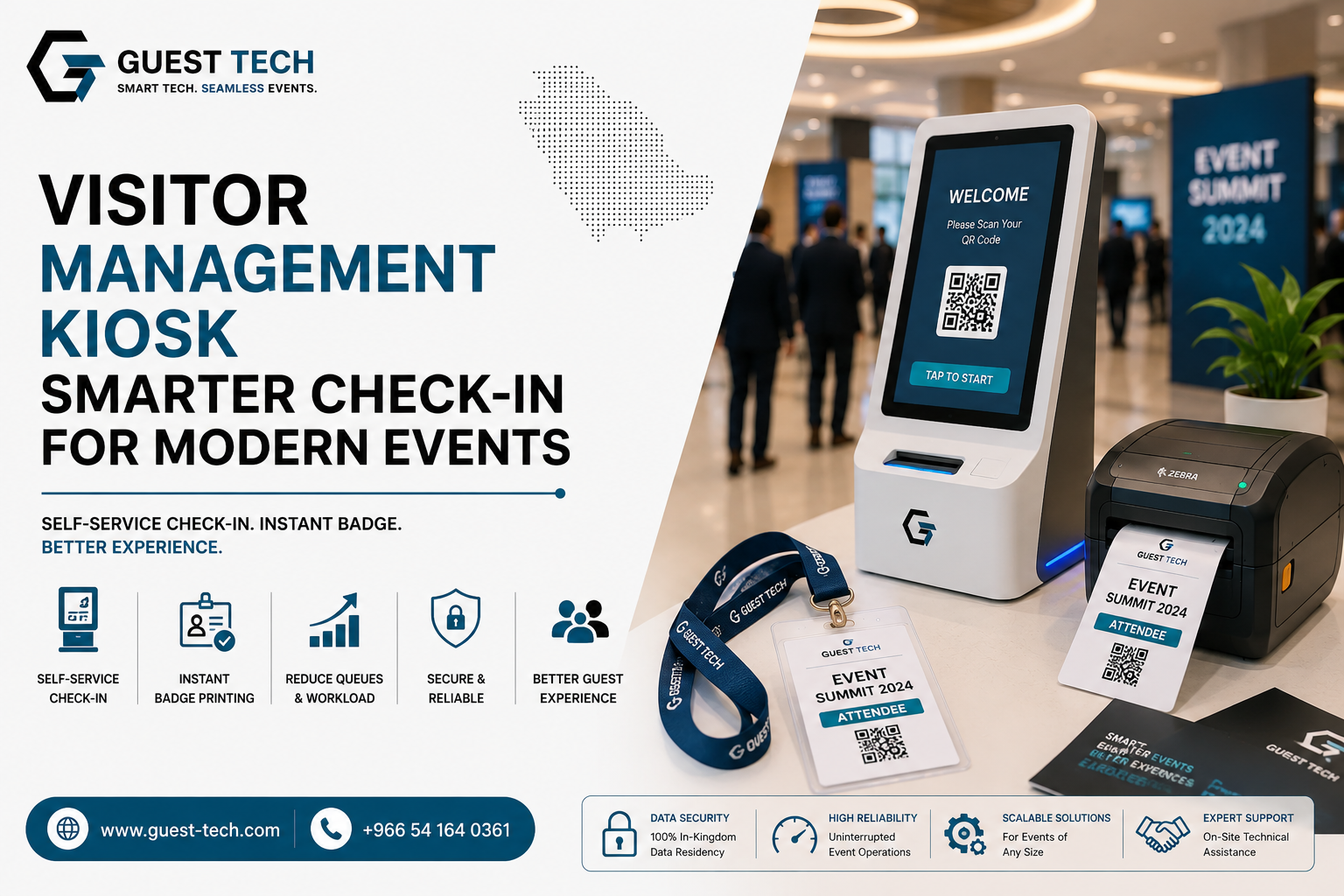
Managing large numbers of guests at conferences, exhibitions, corporate meetings, and other events can become challenging when registration depends entirely on staffed desks. A modern visitor management kiosk provides a streamlined way for guests to complete registration, verify their information, and move through the check-in process with less staff intervention.
What Is a Visitor Management Kiosk?
A visitor management kiosk is a self-service terminal that helps guests complete registration and check-in without requiring an event staff member to handle every step. Depending on the event setup, visitors can scan a QR code, enter registration information, verify their details, and receive an event badge.
Instead of creating a single registration line where staff process every attendee manually, kiosks distribute routine check-in activities across multiple self-service stations. This can make the entrance easier to manage, particularly during busy arrival periods.
How a Visitor Check-In Kiosk Works
A typical visitor check-in workflow combines identification, registration verification, and credential issuance into one process. The exact workflow can be configured according to the event's registration system and operational requirements.
- Visitor Identification: The attendee scans a QR code, enters a registration reference, or uses another supported identification method.
- Registration Verification: The kiosk checks the visitor's information against the event registration database.
- Information Confirmation: The visitor reviews or provides the required information through the touchscreen interface.
- Badge Issuance: Once the registration is confirmed, the connected badge printer can produce the visitor's event credential.
- Event Entry: The attendee can proceed toward the appropriate entrance or access point without waiting for a separate registration desk.
Why Events Use Self-Service Kiosks
Event registration often involves repetitive tasks that can consume staff time. Self-service technology moves many of these routine actions directly to the attendee, allowing event teams to focus on exceptions, technical assistance, VIPs, and other responsibilities.
- Shorter Registration Queues: Multiple kiosks can process visitors simultaneously during peak arrival periods.
- Lower Manual Workload: Staff do not need to perform every routine registration action themselves.
- Faster Badge Issuance: Connected printers can produce badges immediately after verification.
- Consistent Check-In: A guided digital workflow provides visitors with a clear and repeatable registration process.
- Scalable Deployment: Additional kiosk stations can be introduced when an event expects higher visitor volumes.
Visitor Management Kiosk vs. Traditional Registration Desk
Staffed registration desks remain valuable for visitors who need assistance, but using staff for every routine check-in can create bottlenecks. A kiosk can handle straightforward registrations while staff members remain available for more complex situations.
| Feature | Traditional Desk | Self-Service Kiosk |
|---|---|---|
| Visitor identification | Staff assisted | Visitor initiated |
| Registration verification | Staff/system assisted | Digital workflow |
| Badge printing | Staff operated | Can be automated |
| Peak-period scalability | Requires more staff | Additional kiosks can be deployed |
Where Can Visitor Management Kiosks Be Used?
Kiosk-based registration can be adapted to different event environments and visitor journeys. The deployment should be planned around the venue layout, expected attendance, registration workflow, and peak arrival periods.
- Corporate Conferences: Help process large groups of delegates during concentrated arrival windows.
- Trade Shows: Support continuous visitor registration throughout exhibition hours.
- Exhibitions: Provide convenient self-service check-in at busy entrance areas.
- Multi-Day Events: Support recurring visitor check-in and credential workflows.
- Corporate Meetings: Create a professional and organized arrival experience for invited guests.
Badge Printing From a Check-In Kiosk
Badge collection can become another bottleneck when registration and printing are handled at separate counters. A badge printing kiosk combines these stages by allowing the visitor's credential to be produced after successful verification.
Depending on the event requirements, kiosk deployments can support different badge formats and printing workflows. This gives organizers flexibility when designing registration areas for conferences, exhibitions, corporate events, and other high-volume gatherings.
Planning the Right Kiosk Deployment
The effectiveness of a kiosk system depends on more than the hardware. Event organizers should consider the complete visitor journey before deciding how many units are required and where they should be installed.
- Expected Visitor Volume: Estimate peak arrivals rather than looking only at total attendance.
- Venue Layout: Position kiosks where visitors can easily find and access them without blocking entrances.
- Registration Platform: Ensure the kiosk workflow is compatible with the event's registration system.
- Badge Requirements: Select suitable printing hardware based on badge type, branding, and event duration.
- Technical Support: Plan for backup equipment and on-site support for high-volume events.
How Guest-Tech Supports Event Kiosk Deployment
Guest-Tech provides event technology solutions designed to support registration, check-in, badge printing, and visitor management requirements. Its kiosk solutions can be incorporated into event environments where organizers need a more streamlined visitor journey.
From selecting the appropriate hardware to configuring registration workflows and supporting event-day operations, the kiosk setup can be planned around the expected visitor volume and venue requirements. This helps organizers create a registration environment that combines self-service convenience with professional event support.
Frequently Asked Questions
What is a visitor management kiosk?
A visitor management kiosk is a self-service terminal that allows guests to complete registration, verify their details, check in, and, when configured with a printer, receive an event badge with minimal staff assistance.
Can a visitor management kiosk print event badges?
Yes. A kiosk can be connected to a badge printer so that a visitor can receive their event credential after successful registration and verification.
Can kiosks help reduce event registration queues?
Yes. Multiple self-service kiosks can process visitors at the same time, helping reduce the pressure on traditional staffed registration desks during peak arrival periods.
What types of events can use visitor management kiosks?
Visitor management kiosks can be used for conferences, exhibitions, trade shows, corporate meetings, multi-day events, and other gatherings where efficient visitor registration and check-in are required.
Can kiosks work with event registration software?
Yes. Compatible kiosk deployments can connect with event registration software to verify visitor records and support digital check-in and badge issuance workflows.
Streamline Visitor Check-In at Your Next Event
Create a faster and more organized registration experience with Guest-Tech's visitor management kiosk solutions. From self-service check-in and visitor verification to badge printing, build an event registration setup designed around your audience and venue.
Request a Quote